Mechatronics and Robotics I is an elective at CU Boulder introducing microprocessor architecture and programming, sensor and actuator selection, robotic systems, and design strategies for complex multi-system devices.
For a semester-long group project with a class-driven theme, we organized a class-wide competition. Our objective was to design an autonomous, tank-like robot capable of navigating a maze-like arena while competing in a game of dodgeball.
The final design report can be downloaded below, and my individual contributions are documented throughout this page.
Rules
A set of constraints and rules was established by our professor to guide the design process.
Key rules included:
Budget: Total project cost must not exceed $200.
Size: The robot must fit within a 14” x 14” box and not exceed 15” in height, including the unobstructed height of the can.
Target Identification: The robot must carry a coffee can wrapped in a 'hot' pink sweatband for target identification by the opposing robot. The can must be mounted at the top, with its bottom positioned 10" from the floor, the top 15" from the floor, and with a tolerance of 0.25". The lower three-fourths of the can may be obscured or used for stabilization, but the upper 5" must remain unobstructed.
Projectiles: Only approved projectiles are allowed, with Nerf Rival balls chosen for our design.
Autonomy: The robot must operate autonomously and will be placed randomly at the start of each round within the designated starting areas.
Components: The robot may have a maximum of three microcontrollers or similar devices and can carry up to two cameras (IR sensor pairs are excluded).

Preliminary Design
Our initial design was inspired by the movement principles of the iRobot Roomba. The drive system allows the robot to rotate and pivot in place by moving its wheels in opposite directions, turning left or right without changing position.

Initial Design Diagram
For autonomous navigation and detection, we used two IR sensors and a Pixy camera for object detection. The IR sensors were mounted at the front of the chassis, facing downward to track floor color. Detecting white indicated the robot had reached the tape marking the battlefield boundary, triggering a turn to avoid crossing it; detecting black meant the robot was within bounds and could continue normal operations, including navigating the battlefield and locating opponents. A front-facing sonar sensor worked alongside the IR sensors to help prevent collisions with obstacles.
Above the main chassis, multiple levels of laser-cut acrylic supported the electronics, firing mechanism, Pixy camera, and coffee can target. These levels improved organization and isolation of electronic components and were adjustable using wingnuts to accommodate the necessary electronics.
Chassis Design
The robot's chassis was 3D-printed using a design created in SolidWorks, providing mounting locations for all electrical and mechanical components. The chassis was made from PLA, allowing for rapid design iterations with fewer restrictions. The main base accommodates the wheels, stepper motors, and mounting spots for IR sensors and radar. These mounting locations were integrated into the 3D-printed design to ensure compact packaging of the drive mechanism.

3D-Printed Chassis with Motors, Wheels, and Bearings Installed
Motion from the drive wheels works alongside the sonar and IR sensors to detect boundary lines and physical obstructions. When an obstacle or boundary is detected, the robot rotates in place until the path is clear, allowing it to navigate the arena in a waffle pattern until a competitor is detected, triggering the firing mechanism.

CAD Model of the Base Chassis
The robot’s movement is powered by two wheels connected to stepper motors, while two spherical bearings provide additional stability for the chassis.

Corner View of 3D Printed Chassis with Wheels
The flywheels are powered by two DC motors to propel the balls forward. Made from TPU 3D-printed filament, the flywheels flex to grip the balls as they pass through the firing mechanism. The flywheels, motors, and internal projectile track are housed within a 3D-printed chassis on the top level of the robot. The firing mechanism works with the Pixy camera to detect when the robot is facing the opposing target, and after a set interval, the solenoid releases a ball to fire.

Complete Shooter Assembly with Nerf Balls Loaded In

Interior of Barrel with a View of the Magazine
The Pixy camera was configured to detect the hot pink sweatband placed on top of every team's robot. Ours was mounted directly above the shooting mechanism, aligning the camera's line of sight with the firing direction. This positioning allowed the robot to fire as soon as a target was detected, without needing to adjust its aim beforehand.

Front View of the Physical Shooting Mechanism

PixyCam Used for Computer Vision
Shooting Mechanism

Side View of the Physical Shooting Mechanism
To keep the robot supplied with ammunition during the match, a funnel system stored a reserve of balls above the firing mechanism, using gravity to feed them down into the flywheels one at a time for firing.
To conserve battery due to the motors' high current draw, the firing motors do not run continuously but only activate when a target is detected.

Complete Firing Mechanism Assembly
The robot is controlled by an Arduino Mega and an Arduino Uno, which communicate through an input pin on the Uno and a corresponding output pin on the Mega. The Mega manages the robot's physical movement and pathfinding, sending signals to a motor controller that operates the two main drive motors. It also receives telemetry from the two infrared sensors, the sonar sensor, and the Pixy camera. The Mega connects to a shield circuit board with dedicated connections to separate daughter boards for the motor controller and sensor suite.
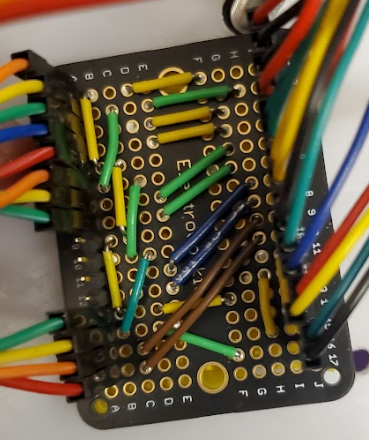
Sensor Breakout Daughter Board
Each battery was wired through its own rocker switch, allowing the drive system and firing mechanism to be powered on or off independently. This made it possible to safely work on one system without disconnecting the batteries entirely and to quickly disable the firing mechanism if needed during testing.
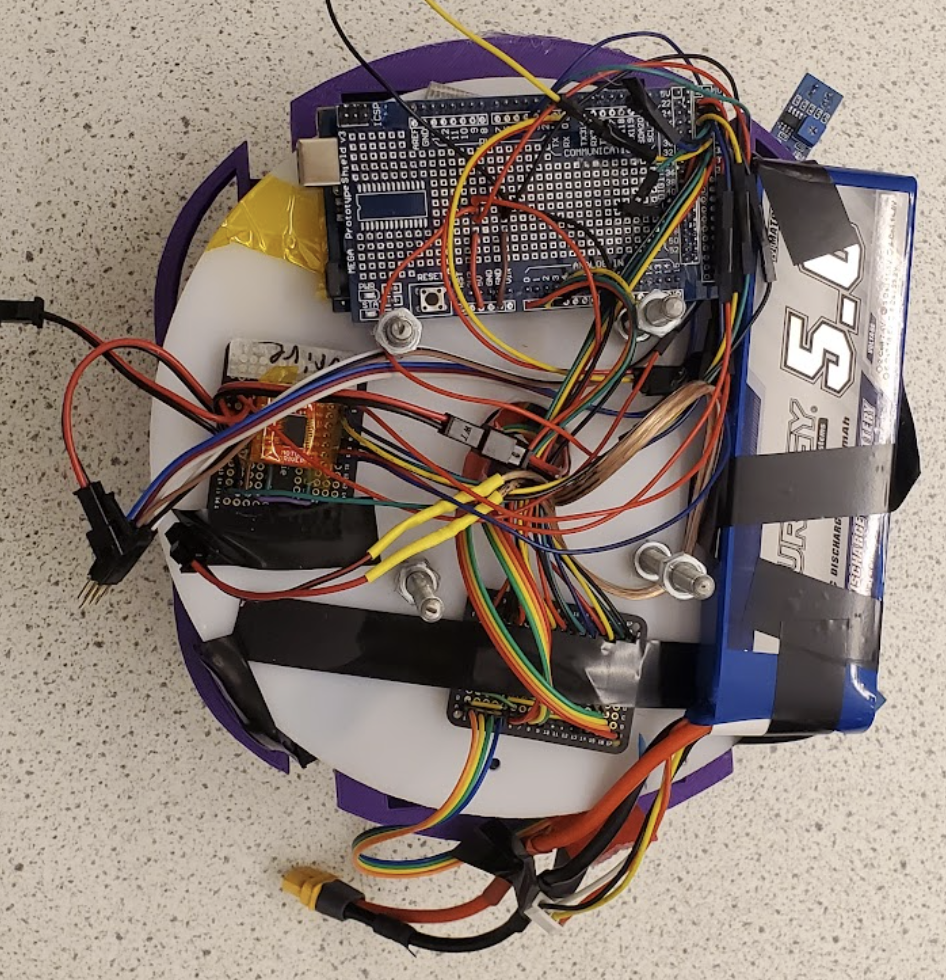
Lower Layer: Arduino MEGA, Lipo Battery, Wheel Motor, Driver, and Electronic Cookie for Sensors Suite.
Circuit Design

Motor Controller Daughter Board

Upper Layer: Shooting Motor Driver, Arduino UNO, and Power Switches for Flywheels.

Arduino Mega Shield with Soldered Connections
The Arduino Uno, in contrast, controls the ball interaction mechanism. It sends signals to a daughter board housing a motor controller, which operates the flywheel motors on one side and the release solenoid on the other.

7.4V and 11.1V Power Rocker Switches
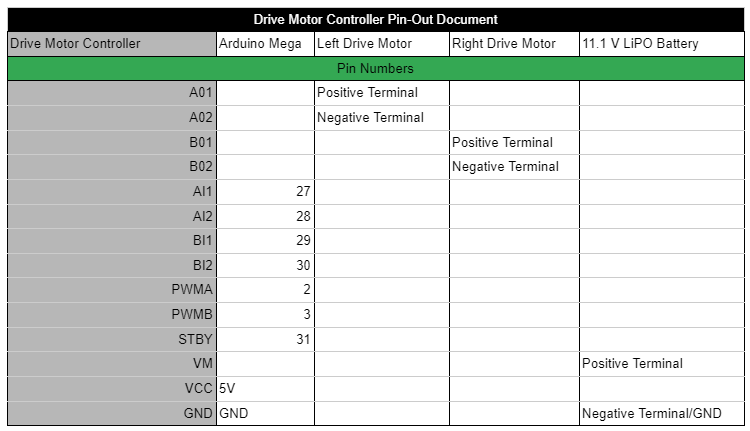
The 11.1V battery powered the Arduino Mega via a barrel jack and supplied the drive motors through the Vm pin. The Mega then distributed 5V to the sensor suite and motor controller from its onboard 5V terminal.
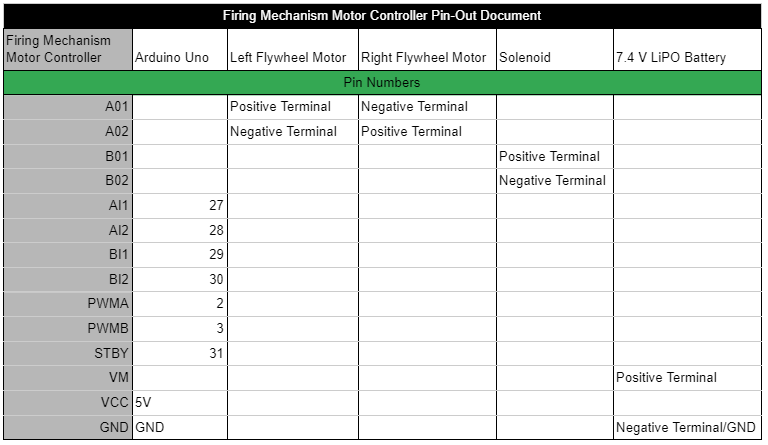
The 7.4V battery powered the Arduino Uno via a barrel jack and supplied the flywheel motors through the Vm pin. The Uno then provided 5V to the motor controller from its onboard 5V terminal.
Daughter boards became necessary after encountering multiple shorts and open connections in the original full-function shield. They allowed for easier troubleshooting during both assembly and testing of individual mechanisms and made it faster to replace damaged components.
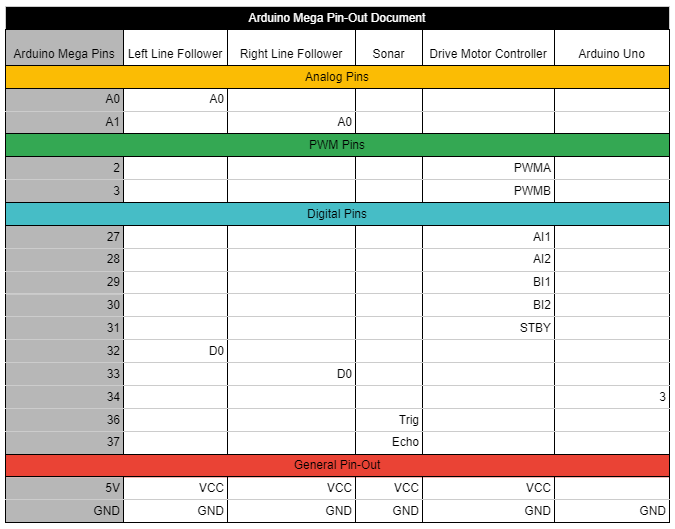
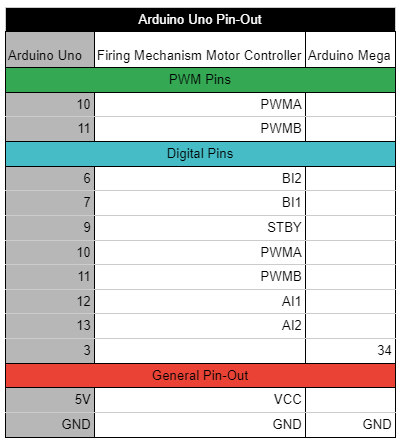
The following tables show the pin-to-pin connections for all electrical components within the robot. The first table details the connections for the Arduino Mega, the second for the Arduino Uno, the third for the drive motor controller, and the final table outlines the pinout for the firing mechanism motor controller.
Coding/Functionality
The shooting mechanism keeps the flywheels running at a low RPM while the Uno continuously monitors for digital input from the Mega. When a high state is detected on the input pin, the flywheels spin up to a higher RPM and the solenoid triggers to release a Nerf ball, after which the flywheels slow back down. This process runs independently of the Mega, allowing the robot to continue tracking the opposing robot during spin-up and firing.
If no enemy robots are detected, the Mega uses the two front IR sensors and the front-facing sonar sensor to determine which sides are clear for movement, moving left, right, or backward at an angle to avoid obstacles.
A variable called "directionality" was implemented to handle edge cases: if the robot starts moving right to escape a corner, it's more likely to continue turning right when multiple sensors activate simultaneously. Another variable, "panic," handles situations where the robot becomes stuck in a corner — it counts down to 0 while moving straight but counts up to 70 while avoiding obstacles, at which point the robot performs a full turn. If no sensors are triggered, the code proceeds to the next step in the decision matrix.
The video above shows our robot starting in a corner and navigating the arena while avoiding the lines and boxes
When no enemy robots or obstacles are detected, a generic movement routine executes: the robot drives forward in a straight line to avoid incoming shots and potentially gain line of sight with an enemy robot. After moving forward for a set duration without interruption, the robot performs a 360-degree pivot, using the Pixy camera to search for targets as described earlier. This is the final stage of the control system before it loops back to the beginning.
The video above shows our robot scanning for potential targets before continuing to navigate the maze
The robot's control system uses two interconnected Arduinos, linked via ground pins and a shared digital input/output pin, as outlined in the previous section. The Arduino Mega serves as the primary control system, using a decision matrix based on sensor inputs and internal variables to control the robot's movement in the arena. The Arduino Uno is dedicated solely to managing the firing mechanism.
Regardless of its starting orientation, the robot's first action is always to scan with the Pixy 2 camera to determine whether it's facing the opposing robot. This prioritizes scoring by attempting to shoot rather than evading shots from other teams. This strategy proved effective in the first round of the tournament, where the robot remained stationary upon detecting the opposing robot and fired its available ammunition.
The video above shows our robot detecting the pink sweatband on top of an opposing robot, centering its aim, and then firing
If the Pixy camera detects an enemy, one of two scenarios can occur. In the first, the enemy is detected but not centered in the camera's view, and the robot turns to align it, triggering the second scenario. In this scenario, once the enemy is centered, the robot immediately initiates the firing process.
This process begins by setting the Mega's digital output pin to high, signaling the Uno to start shooting (detailed below). After firing, tracking resumes: if the enemy remains centered, the robot fires again; if it's detected but off-center, the first scenario repeats; if it leaves the camera's sight line, the robot reverts to the movement matrix.
The Arduino code controlling all the actions described above is listed in the slide deck to the left.
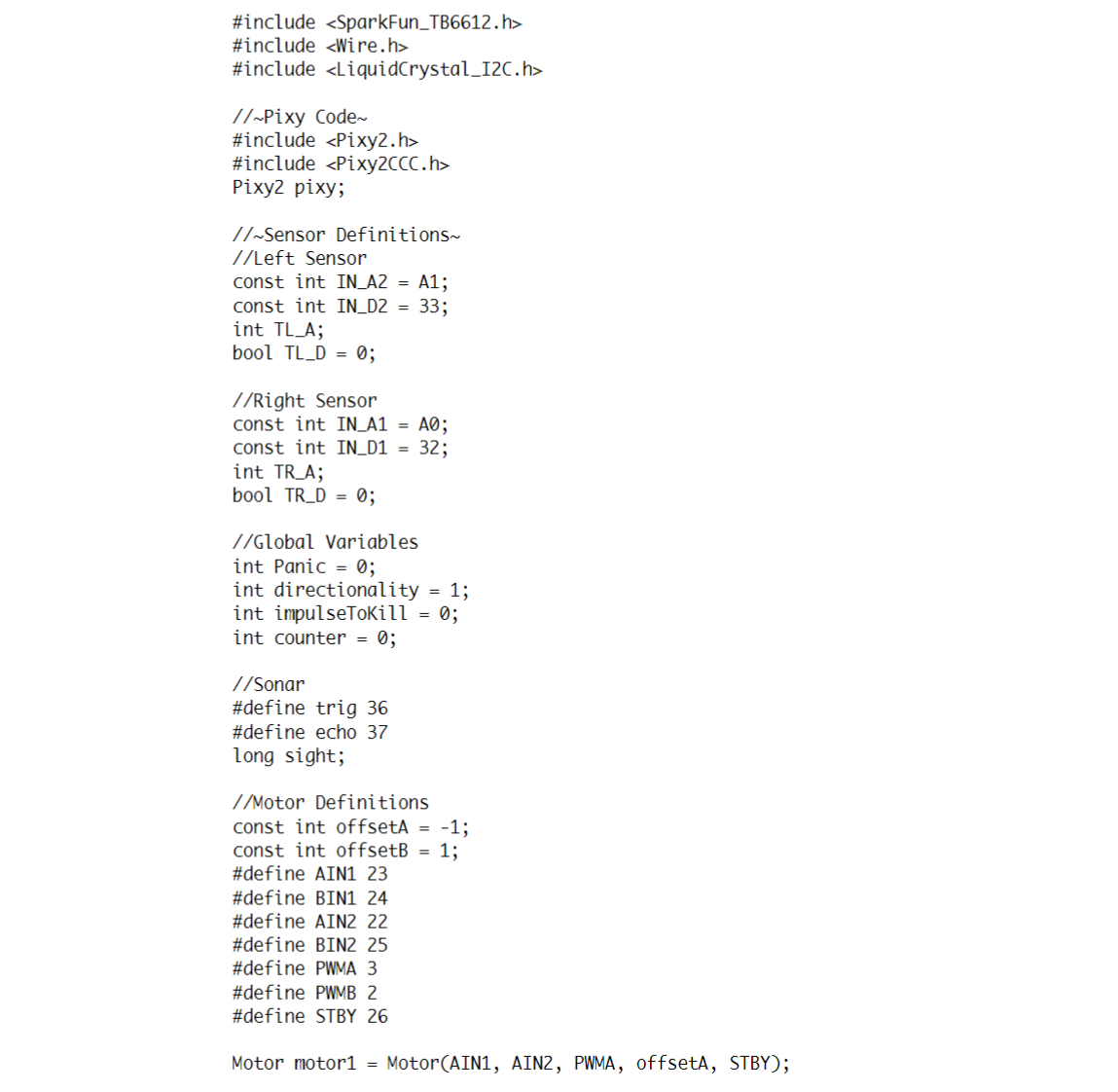
Arduino MEGA Code Pt. 1

Arduino MEGA Code Pt. 2

Arduino MEGA Code Pt. 3
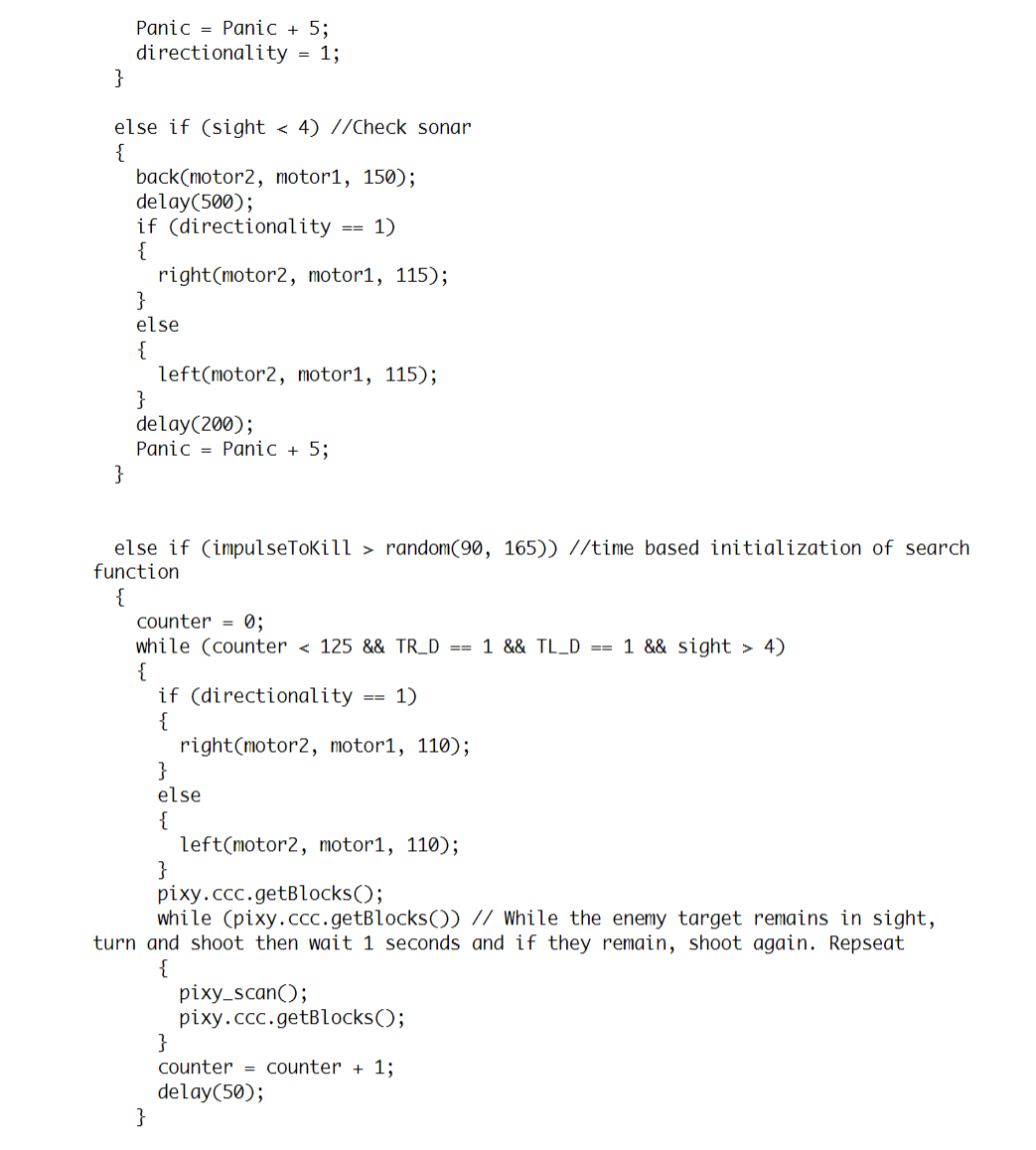
Arduino MEGA Code Pt. 4

Arduino MEGA Code Pt. 5

Arduino MEGA Code Pt. 6
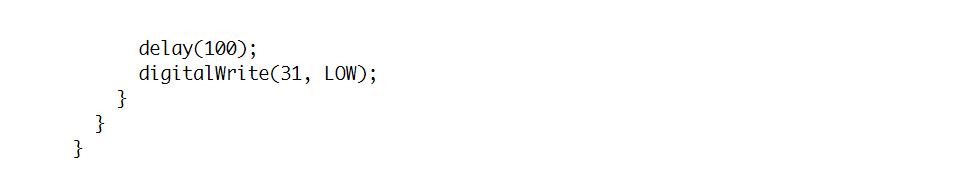
Arduino MEGA Code Pt. 7

Arduino UNO Code Pt. 1

Arduino UNO Code Pt. 2
Throughout this project, I developed skills in Arduino programming to control multiple sensors and motors, and improved my ability to integrate code, circuits, and mechanical components into a cohesive working design.
I also applied soldering, circuit continuity testing, budgeting, and SolidWorks design to accommodate multiple moving parts.
